












Android POS Workstation

Android POS Workstation

It replaces traditional cashier’s PCs with a modern, mobile, and flexible POS workstation.

Featuring in-Display NFC and a Payment Solution for secure contactless and cash payments, it includes a rotating docking station for flexible use, barcode scanning, and independent Dual-Display for staff and customer displays. Powered by Qualcomm ME65 and ME65HC mobile computers, it ensures uninterrupted 5G and Wi-Fi 6/6E connectivity with Seamless Roaming. This compact, versatile solution streamlines employee workflows, supports mobility away from the workstation, boosts productivity, and enhances customer loyalty. With seamless peripheral integration, it sets up in just one minute.

Core Advantages of Android POS

Integrated Mobile Payment Solution

Secure, Flexible Payments with Worldline Tap on Mobile

  • Contactless and Cash Payments: Supports secure NFC payments via Visa, Mastercard, Google Pay, Apple Pay, and connects to cash drawers.
  • Powered by Worldline: Utilizes Tap on Mobile technology from the global payment leader for fast transactions.
  • Enterprise-Grade Security: Software-based CPoC ensures compliance with highest security standards.

Rotational Docking Station for Flexibility

Adaptable Design for Multi-Scenario Use

  • Optimized Viewing Angles: 180° horizontal and 40° vertical rotation supports use as third independent screen.
  • Versatile Functionality: Tilt/rotate for barcode scanning, QR display, photo capture, or data entry.
  • Enhanced Engagement: Switch between customer interactions, loyalty scanning, and data visualization.

Dual-Display for Immersive Interaction

Independent Displays for Staff and Customer Engagement

  • Tailored Customer Experience: Second display shows purchase details, receipts, or promotions.
  • Independent View Mode: MeScreen Technology allows separate content on staff/customer screens.
  • Enhanced Productivity: Staff handle transactions while customers view dynamic content.

Key Features & Benefits

Replace Traditional Cashier WS in 1 Minute

Quick and Effortless Workspace Setup

Android POS eliminates outdated cashier setups by transforming the ME66 or ME65HC mobile computer into a modern workstation in just one minute. Simply dock your device to gain instant access to a fully functional POS system.

  • Manages payments, inventory, and customer interactions
  • Ideal for retail, healthcare, and hospitality environments

Multi-Interface Docking Station

The Core of Your Android POS Workstation

  • Dual-Display Connectivity: HDMI and USB-C ports for independent staff/customer displays
  • Peripheral Support: USB-A and retail ports for keyboards, printers, and cash drawers
  • Stable Network: 100 Mbps connectivity for local/cloud system access

Rapid Workspace Deployment

Quick Configuration with MeSyach

  • Instant Setup: Transfer Wi-Fi, 5G, Bluetooth and scanner settings via QR code
  • Efficient Replacement: Deploy new workstations without operational delays
  • Streamlined Installation: 80% faster workstation deployment

EdgeControl Technology

Precision Management for Peripheral Devices

 Intelligent Control: EdgeControl Technology, with its embedded CPU and memory in the docking station, ensures precise management of peripheral connections, reducing the processing load on ME65 and ME65HC mobile computers.

 Extensive Compatibility: Seamlessly connect printers, scanners, cash drawers, keyboards, scales, and more via USB, Ethernet, Bluetooth, or Retail Ports.

 Optimized Workflows: Streamline operations across retail, logistics, and healthcare with reliable performance and smooth integration of all connected devices.
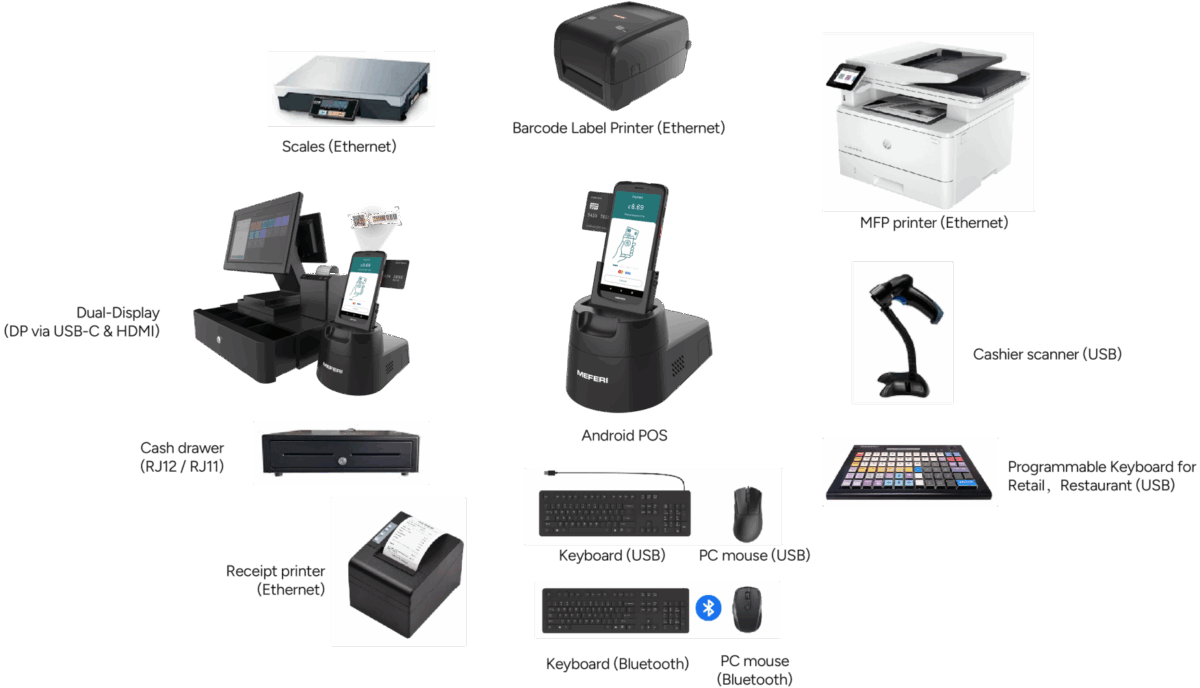
Android POS workstation

Zero-Touch Enrollment: Ready Out of the Box

With Android Enterprise Zero-Touch Enrollment via SOTI MobiControl, ME65 and ME65HC devices are fully operational from the moment they are unboxed. Once connected to the internet, the devices automatically retrieve their assigned enterprise configuration and enroll without manual setup.

Tailored Settings: Wi-Fi, 5G, OS policies, scanner parameters and security configurations are automatically applied to match operational workflows.

Automated Processes: Applications, updates and device policies are deployed remotely without manual IT intervention.

Smart Grouping: Devices are automatically assigned to the correct store, warehouse, clinic or department within the MDM environment.

This streamlined deployment model reduces IT workload, accelerates rollout and ensures ME65 and ME65HC devices are business-ready immediately after activation.Read More »

MEFERI SOTI MDM & EMM enterprise mobility solution

Undock, Perform Tasks, and Return with Ease

Android POS gives users the freedom to undock the ME65 or ME65HC mobile computer and handle tasks like inventory checks, price adjustments, receiving goods, or customer assistance directly on the go. After completing tasks, simply dock the device back into the workstation to continue working seamlessly on the large LCD screens, maintaining uninterrupted workflows and maximizing mobility.

Service & Maintenance Advantages Over Traditional Cashier Workstations

Maximized Value: 40% Infrastructure Savings and 80% Maintenance Cost Reduction

Infrastructure Cost Savings

Up to 40% Reduction

Scalable Implementation:

No need for extensive overhauls or huge initial capital; add devices as your business grows.

Reduced Energy Consumption:

Energy-efficient ME6X devices consume less power than traditional PCs, lowering energy bills and contributing to long-term cost savings.

Optimized Space Utilization:

The compact design of MeMobilityDesk replaces bulky PC setups, freeing up valuable workspace and enhancing overall efficiency.

License-Free Operation:

Access server-based software (ERP, CRM, etc.) without costly per-device licenses, unlike traditional PCs.

Cloud or On-Premises Flexibility:

Choose between cloud-based or on-premises storage and management to fit your security needs.

Integrated Connectivity:

Supports Wi-Fi, Ethernet, and 4G LTE/5G for constant connectivity, keeping devices operational in all environments.

Android Enterprise Recommended & GMS:

Benefit from AER standards and GMS apps for a streamlined and secure user experience.

Lower Training Costs:

The intuitive interface of MEFERI devices minimizes the need for extensive employee training, enabling faster onboarding and reducing associated expenses for growing teams.

Streamlined Installation:

Quick and efficient deployment of MeMobilityDesk workspaces minimizes setup time and costs, ensuring seamless integration into your business operations.

Reduced Hardware Requirements:

Less equipment needed compared to traditional PC setups.
Better quality, lower TCO!

PC Maintenance Cost Savings

Up to 80% Reduction

Rapid Replacement and Configuration:

Unlike traditional PCs, ME6X Series devices can be replaced & configured instantly using MEFERI MeSynch App or with SOTI MDM/EMM with a single scan, reducing downtime.

No Need for Reserve PCs:

Eliminates the need for pre-configured reserve PCs, as new devices be quickly set up & deployed, saving storage & costs.

Streamlined Repair Process:

While damaged devices are being repaired, operations continue seamlessly, avoiding productivity losses.

Built for Longevity:

MEFERI devices are manufactured with Qualcomm chipsets, high-quality components, ensuring reliability & low TCO over time.

Integrated Remote Diagnostics with MDM/EMM:

Use SOTI, advanced MDM/EMM solutions, to remotely diagnose and resolve issues, reducing labor costs and accelerating resolutions.

Streamlined Software Updates:

Centralized and automated updates ensure devices are always running the latest and most secure software.

Automated Backups:

Reliable backup systems (cloud or on-premises) save on data recovery costs and ensure optimal protection.

Simplified Device Replacement:

Streamline the replacement process by pre-configuring new devices with SOTI Zero-Touch Enrollment, ensuring minimal disruption and reducing IT labor costs.

Enhanced Device Durability:

Robust design ensures devices withstand demanding environments, reducing repair and replacement costs.

Remote Troubleshooting:
Further reduce costs by resolving minor issues remotely through centralized tools.

Hardware Solution Basic Part

Solution Software Basic Part

MeScreen

Extends M6QX workspaces to LCDs.

ALocker

Controls accessible applications securely.

MeSynch

Quickly transfers settings via QR.

Android 13 with AER

Secure, enterprise-ready OS.

Google Mobile Services (GMS)

Essential apps and APIs.

OmniSoftware Suite

Customizable tools for productivity.
SOTI icon

SOTI MDM/EMM System

Device management and diagnostics.

OmniIndustry App Suite

Industry-specific app integration.

Ready to Start with Android POS?

Yes!

Contact us to get a tailored offer, answer your questions, provide a demo unit for testing, or assist in launching a pilot project.

Contact us for a customized offer, to answer your questions, provide a demo unit for evaluation, or assist with launching a pilot project tailored to your needs.

Contact Sales

For partnerships, distribution, bulk orders, and product consultations.

Contact Support

Get assistance with troubleshooting, repairs, warranties, and service plans.

Contact Us


    I agree to the   Privacy Policy   and consent to MEFERI processing my data to respond to my inquiry.

    Unit 3-2, Building 4, No. 2555, Section 2, Huanglong Avenue, Shuangliu District, Chengdu 610000, Sichuan, P.R. China


    MEFERI at EuroShop 2026 – request your free visitor ticket
