


从扫描到机器人运动:AIDC、WMS、WCS、RMS 和 PLC 如何协同工作
A modern warehouse is not run by a single software platform. Let’s look at how mobile computers and other AIDC devices connect physical operations to the WMS, while WCS, RMS, and PLCs manage material flow, robot tasks, and fixed automation at their respective levels.
When people talk about warehouse automation, they usually think first of WMS platforms, conveyors, and mobile robots. But software systems do not work with boxes and pallets as physical objects — they work with data about them.
To move an item to the correct storage location, the WMS needs to know what the item is and where it is currently located. To pick up a pallet, a robot must be given the pallet’s identifier and location. Before a picking operation can be completed, the system needs confirmation that the operator has actually picked the correct item and placed it in the correct container.
AIDC — Automatic Identification and Data Capture — connects the physical warehouse to its digital environment. AIDC technologies include barcodes, RFID (radio-frequency identification), machine vision, voice technologies, location tracking systems, scanners, and mobile computers.
AIDC helps an information system answer a practical question: what has just happened to the item in the physical world?
Who Is Responsible for What?
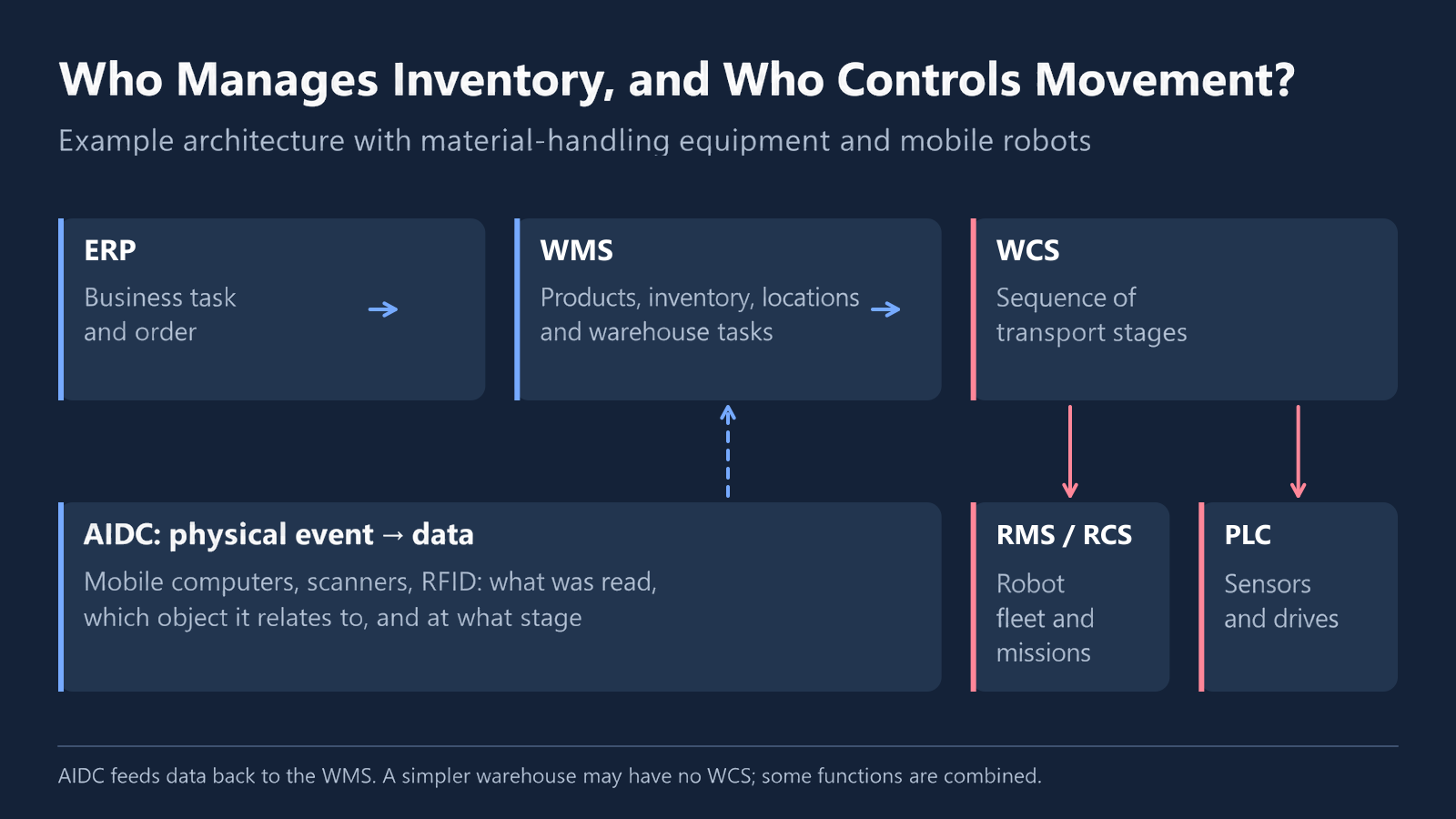
An automated warehouse can be compared to a team in which each participant has a clearly defined role. One system manages the movement of goods, another coordinates material-handling systems, and a third assigns tasks to robots. If the process also involves conveyors, lifts, or other fixed equipment, PLCs operate at the lower control level: they receive commands from higher-level systems, process sensor signals, and control the equipment’s drives and mechanisms.
In industry, these layers are commonly referred to by the following abbreviations:
| Layer | Full Name | Responsibility |
|---|---|---|
| ERP | Enterprise Resource Planning | Captures the initial business requirement: receive an inbound shipment, prepare an order, or issue materials to production |
| WMS | Warehouse Management System | Manages inventory movements, storage locations, and warehouse tasks |
| WCS | Warehouse Control System | Coordinates material-handling equipment and automated subsystems |
| RMS / RCS | Robot Management System / Robot Control System | Assigns tasks to robots and monitors their execution |
| PLC | Programmable Logic Controller | Controls drives, sensors, conveyors, lifts, and other fixed equipment |
| 人工智能数据中心 | Automatic Identification and Data Capture | Identifies physical objects and records operational events |
Not every warehouse requires all of these layers. For example, the WMS may send tasks directly to the robot management system. Larger, more complex facilities that combine conveyors, automated storage systems, mobile robots, and manual operations typically rely on a more layered software architecture.
The number of systems alone does not determine the quality of automation. What matters is that responsibility for each task is clearly assigned and data moves reliably between systems.
One Pallet, Several Software Layers
Let’s look at a simple example: a pallet needs to be delivered from a storage area to a picking buffer.
An order is created in the enterprise system. The WMS determines which product is required, where it is stored, and where it needs to be moved. At this level, the operation may look like this:
Retrieve pallet P-104 from storage location A-12 and deliver it to picking buffer B-03.
By this stage, the pallet must already have been assigned a digital identifier. This happens during receiving, when an operator scans the product code, prints or verifies the pallet label, and confirms its put-away location. The WMS is therefore working not with an abstract load, but with a specific object linked to known contents and a storage location.
If several types of equipment are involved in the move, the task is passed to the WCS. The WCS determines the sequence of transport stages. For example, a mobile robot may first pick up the pallet and transfer it to a conveyor, after which a lift moves the load to another level.
The WCS passes its part of the task to the robot management system. The RMS checks which robots are available, where they are located, how much battery charge they have left, and which tasks are already in their queues. It then selects the appropriate robot, assigns a route, and monitors its movement.
Once the robot delivers the pallet to the conveyor, control passes to the lower-level automation layer. The PLC processes sensor signals, starts the required conveyor section, monitors the load, and reports when it reaches the next transfer point.
In the picking area, an operator receives a task on a mobile computer. They scan the pallet, product, or container and confirm that the load has been received. The WMS then updates the status of the operation and the product’s location.
Each system performs its own task and returns its own status:
- the RMS reports that the robot mission has been completed;
- the PLC reports that the load has passed through the equipment;
- the WCS confirms completion of the transport stage;
- the WMS confirms completion of the warehouse operation.
Data captured by AIDC devices confirms that each system is working with the physical object specified in the task.
Why a Mobile Computer Is More Than a Scanner
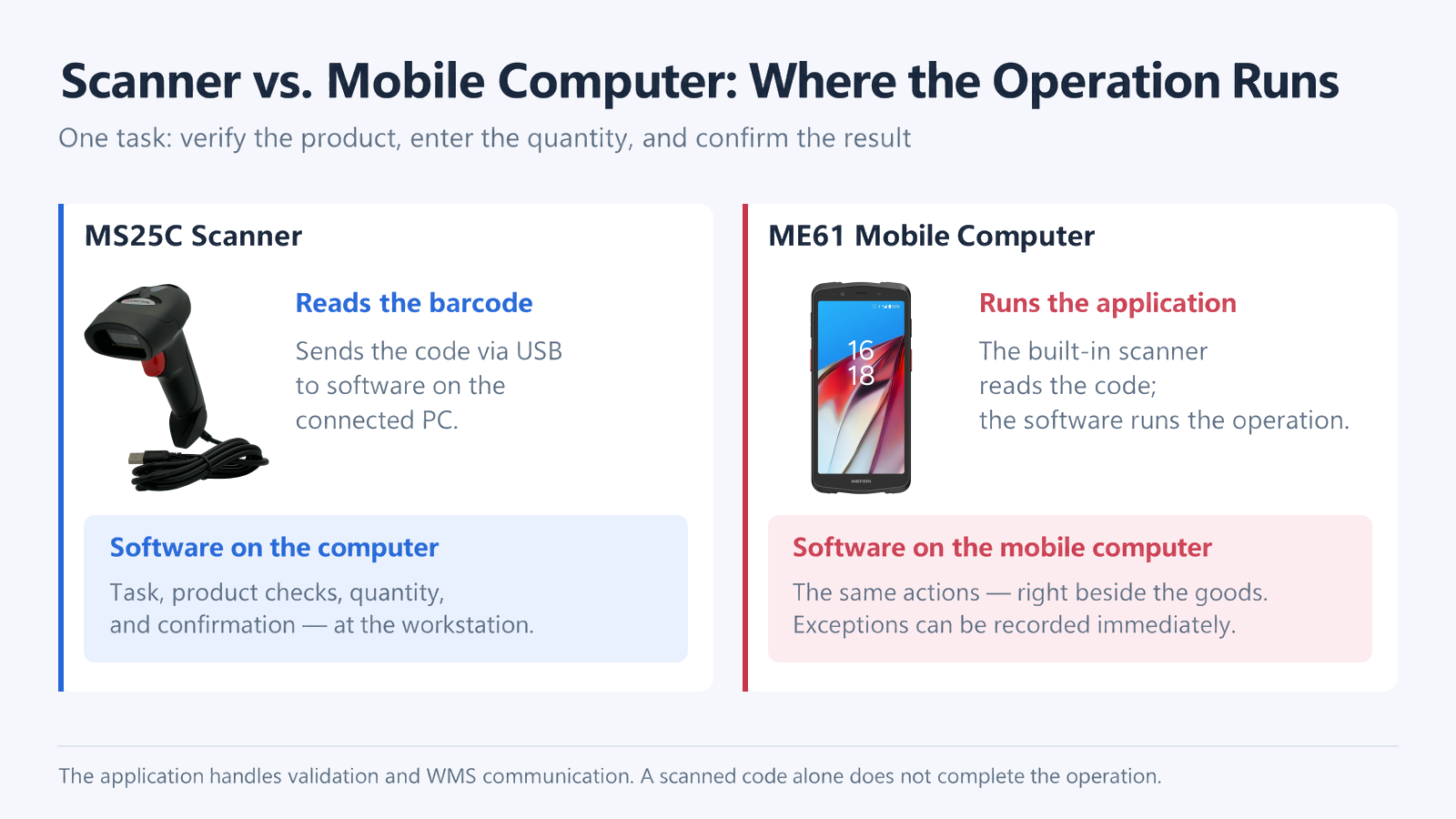
A handheld barcode scanner reads a barcode and sends the resulting characters to a connected computer or another host device.
A mobile computer is a handheld device with an integrated scanning module. It runs the warehouse application, receives tasks, displays instructions to the operator, allows quantities to be entered, records exceptions, and sends the results back to the information system.
In other words, the difference is that a scanner transfers captured data, while a mobile computer also runs the business application and helps the operator complete the operation.
A mobile computer is therefore not just an input device. It is a mobile workstation and a control point in the business process. For example, an operator may scan the pallet ID first and then scan the storage location. The application checks whether the selected location matches the task. If the operator scans the wrong location, the mobile computer flags the mismatch before the move is recorded in the inventory system.
Implementing a WMS and mobile data capture should come before deploying robots. If a warehouse still relies on paper records to track inventory movements and cannot reliably locate a load, a robot can physically move a pallet, but it has no way of knowing which pallet to move, where to pick it up, or where to deliver it.
The typical automation path therefore looks like this: digitize inventory and operational processes → implement management and inventory control systems → integrate mobile computers into daily operations → deploy robots.
A Robot Can Execute the Wrong Task Perfectly
Imagine that, during receiving, a pallet is accidentally assigned the identifier of a different load. A robot cannot detect this kind of error from the pallet’s appearance alone. It travels to the specified location, picks up the pallet, follows the planned route, and places the load at the designated destination. Technically, the robot completes the mission flawlessly. Operationally, however, it delivers the wrong product to the picking area.
Effective robotic automation therefore depends on more than navigation, equipment speed, and WMS logic. Label quality, identifier accuracy, barcode placement, reliable scanning, and required validation checks are equally important.
AIDC can be viewed as the feedback loop between the digital and physical warehouse. Software systems plan and distribute work, while mobile computers, scanners, and RFID readers report what has actually happened.
Why an Arrow Labeled “API” Is Not Enough
On an architecture diagram, integration often looks straightforward: two boxes are connected by an arrow labeled “API”. But the technical ability to transmit a message does not mean that both systems interpret the status of an operation in the same way.
Suppose a robot has delivered a pallet to a buffer. The RMS considers the mission complete. However, the operator has not yet scanned the pallet ID with a mobile computer, so the WMS may still show the pallet as in transit.
Both systems are operating normally, but they interpret the same operation differently. Unless the completion point and the status exchange process are defined in advance, system records will drift out of sync with physical reality.
Before implementation, the project team needs to agree on:
- which system creates the task identifier;
- which system is responsible for storing and managing task priority;
- which system is the source of truth for inventory;
- what constitutes the start and completion of an operation;
- which system is allowed to cancel or modify a task;
- how duplicate messages and loss of connectivity are handled;
- what happens when data in different systems does not match.
This is why the architecture should be designed around the end-to-end flow of goods, not around a list of available APIs. A common problem in warehouse automation projects is that each software system performs its own function well, but the overall process — from receiving to shipping — is not documented end to end.
What Changes When Robots Come from Different Vendors?
A warehouse is rarely automated in a single project. Today, a company may deploy robots for pallet transportation. Tomorrow, it may introduce robotic equipment for narrow-aisle operations. Later, it may add automated forklifts.
Each vendor may use its own RMS. As long as the robot fleets operate in separate zones, little coordination between them is required. Problems arise when their routes intersect.
Robots from different vendors may block one another in a shared zone if their management systems do not exchange data or have visibility into one another’s fleets.
Possible solutions include:
- a single RMS or RCS for all robot fleets;
- coordination through the WMS;
- data exchange through agreed integration protocols.
When designing a multi-vendor warehouse, several questions need to be answered in advance:
- which system controls the shared zone;
- how movement priorities are assigned;
- whether each system can track equipment managed by another vendor;
- whether a new vendor can be added without redesigning the entire architecture;
- which system handles centralized fleet dispatching.
Compatibility is not limited to robot movement. If different subsystems use different identifiers for pallets, storage locations, and tasks, the same physical object may exist under several different names across the software landscape. A warehouse therefore needs a common data model and consistent identification rules.
Where MEFERI Equipment Fits into This Architecture
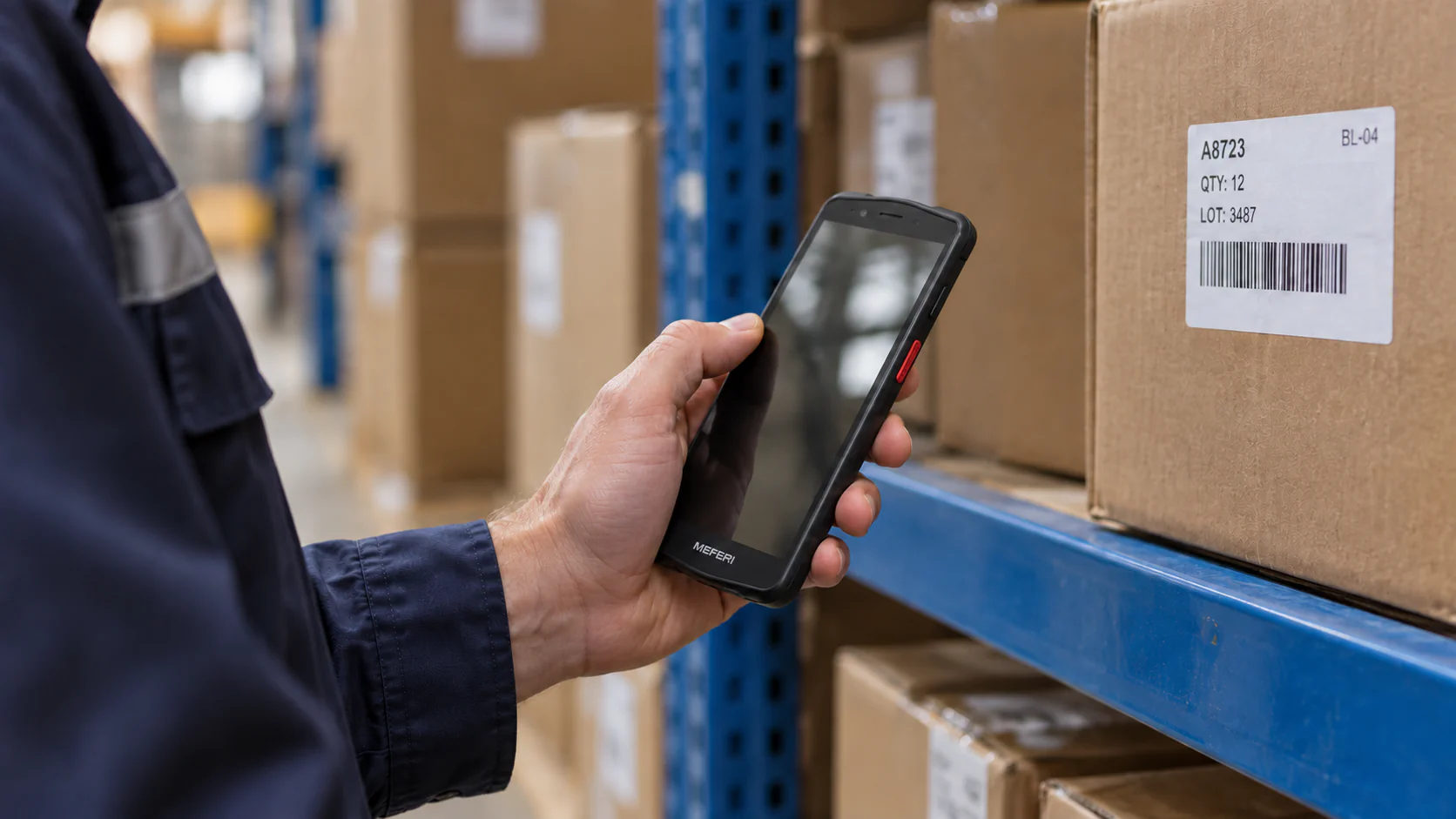
MEFERI devices can perform several functions within the AIDC environment.
Mobile computers receive tasks from the warehouse system, guide the operator through the required sequence of actions, capture identifiers, and record the result.
Barcode scanners support data capture across different use cases — from fixed workstations to hands-free picking.
Mobile and desktop printers produce labels whenever a new trackable unit is introduced — for example, during receiving, packing, internal moves, or shipping.
The operating system and centralized device management tools help maintain consistent application, scanning, connectivity, and access settings across the entire mobile device fleet.
Each device must be integrated into the operational workflow, and every scan must result in a clear, traceable status update in the WMS.
What to Check Before Implementation
Before designing the AIDC layer, it is worth answering several practical questions.
How Is Each Object Identified?
Products, pallets, containers, storage locations, and tasks must all have unique identifiers.
Where Are the Validation Points?
Not every action requires scanning. However, the system must receive confirmation at the points where an error would have the greatest impact.
Which Device Is Best Suited to the Operation?
An operator who frequently enters data may need a handheld mobile computer. For high-volume picking, a wearable computer combined with a ring scanner may be more convenient. At a fixed workstation, a desktop scanner may be sufficient.
What Happens When an Exception Occurs?
An unreadable barcode, an occupied location, a missing pallet, or a lost network connection must trigger a predefined exception-handling process rather than rely on an operator to improvise a solution.
How Is the Device Fleet Managed?
Applications, scan profiles, network settings, and access restrictions should be managed centrally. Otherwise, configurations gradually diverge across the device fleet.
The Digital Warehouse Must Match the Physical One
The quality of a software architecture is not determined by the number of connected systems, but by how consistently they guide the same item through the entire process.
Every decision should have a clearly defined owner. Every stage should have an unambiguous status. And every critical physical operation should have reliable digital confirmation.
AIDC provides that confirmation. If the source data is incorrect, even perfectly configured WMS, WCS, and RMS platforms will simply execute the wrong operation faster and more accurately.
A warehouse robotics project does not start with buying a robot. It begins when the warehouse can uniquely identify a product, determine its location, and record every significant movement. Only then does the robot become part of a managed business process rather than remain a standalone machine that simply moves from point to point.




发表回复